01. Overview

Ecodream is a sustainable brand that aims to produce eco-friendly bags and accessories while promoting environmental responsibility.
Its strengths lie in the message it wants to communicate, in its local production, and in the uniqueness and quality of its products.

However, the current e-commerce website has usability and accessibility issues that make it difficult to navigate and use, contributing to lower conversion rates.

The goal of this project was to redesign the full e-commerce experience without losing the essence of the brand.

02. The Problem

The experience lacked clear information architecture and wayfinding.
Without breadcrumbs, effective filters, or a consistent visual hierarchy, users struggled to understand where they were and how to reach key content.
Important pages required unnecessary steps, interactive elements were difficult to identify, and repetitive copy increased cognitive load, making browsing slower and less intuitive.

  • Unclear Information Architecture
  • Limited Navigation and Discoverability
  • Weak Content Hierarchy and Interaction Clarity

03. Proposed Solution

Redesign the EcoDream shopping experience to make it clearer, more accessible, and easier to navigate, without losing the brand’s handcrafted identity.

  1. Simplify the structure Create a clearer information architecture with consistent navigation and breadcrumbs.
  2. Improve product discovery Introduce search and filters to help customers find relevant products more efficiently.
  3. Build clarity and trust Reorganize product, policy, and sustainability information within a stronger visual hierarchy.

These improvements would help customers understand EcoDream’s value and purchase with more confidence.

04. Research Process

I evaluated the end-to-end shopping experience to identify where navigation, accessibility, and content discovery were creating friction.

What I did

  1. Heuristic evaluation and accessibility audit
  2. Competitive benchmark — 7 brands
  3. User survey — 55 participants
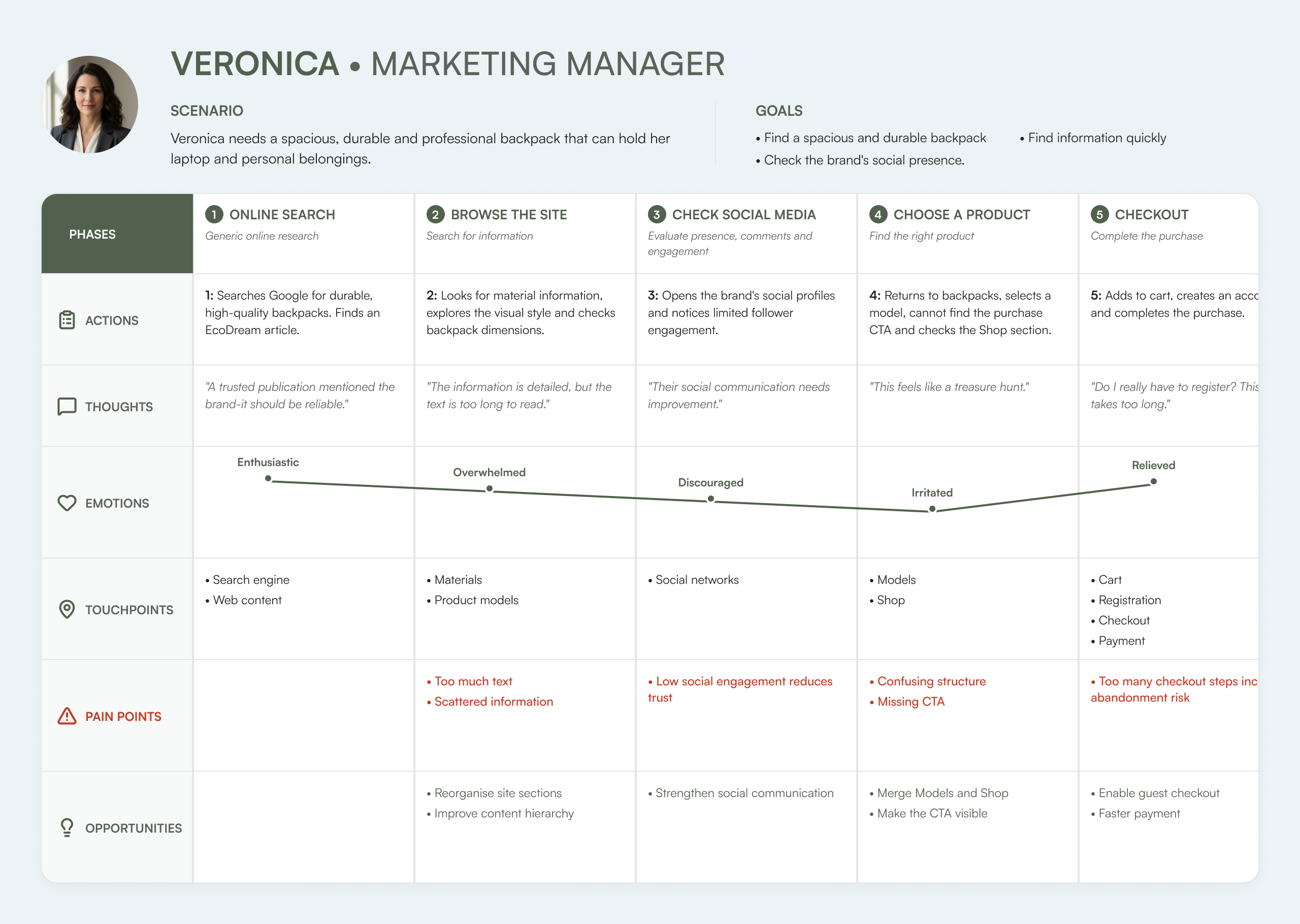
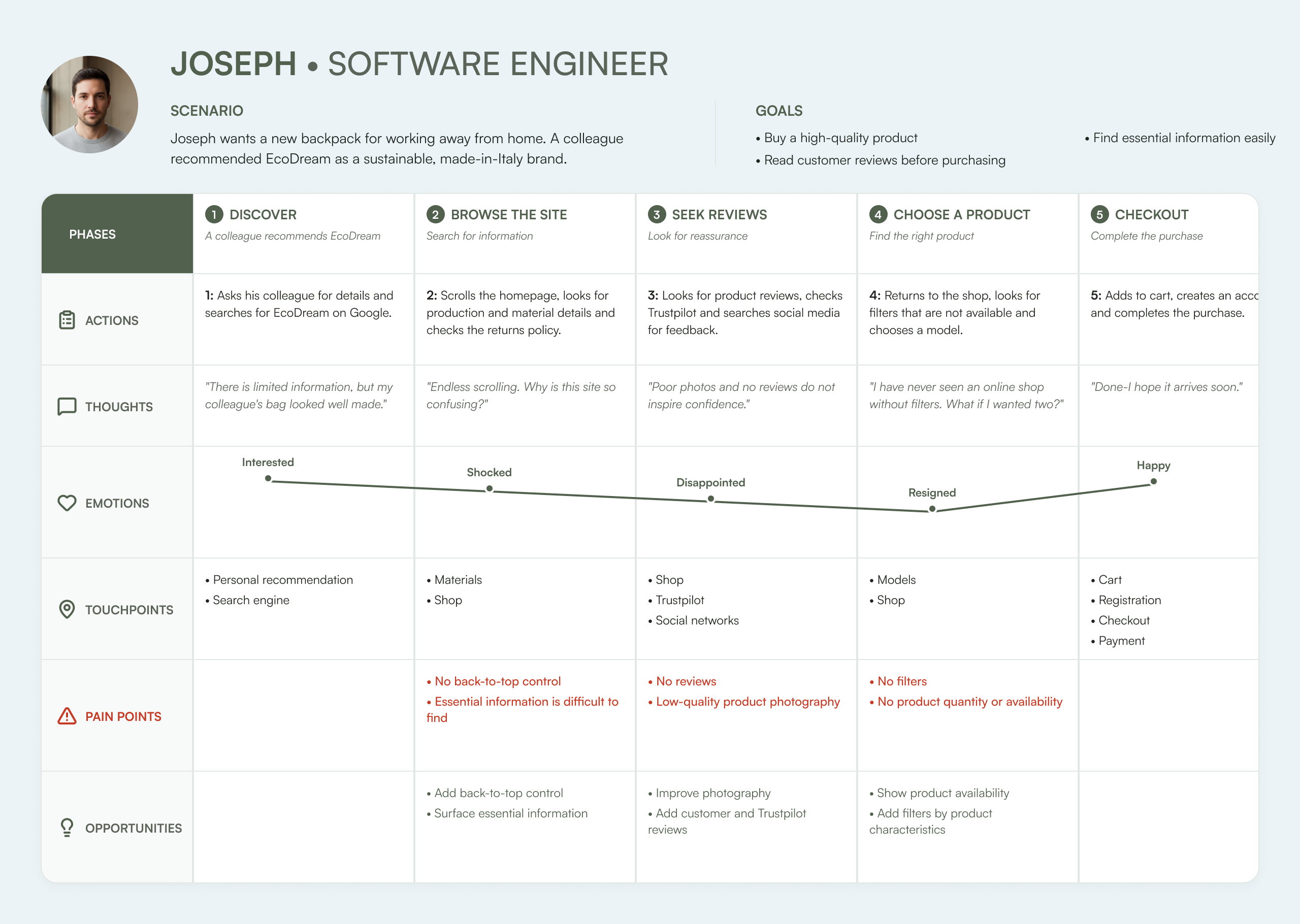
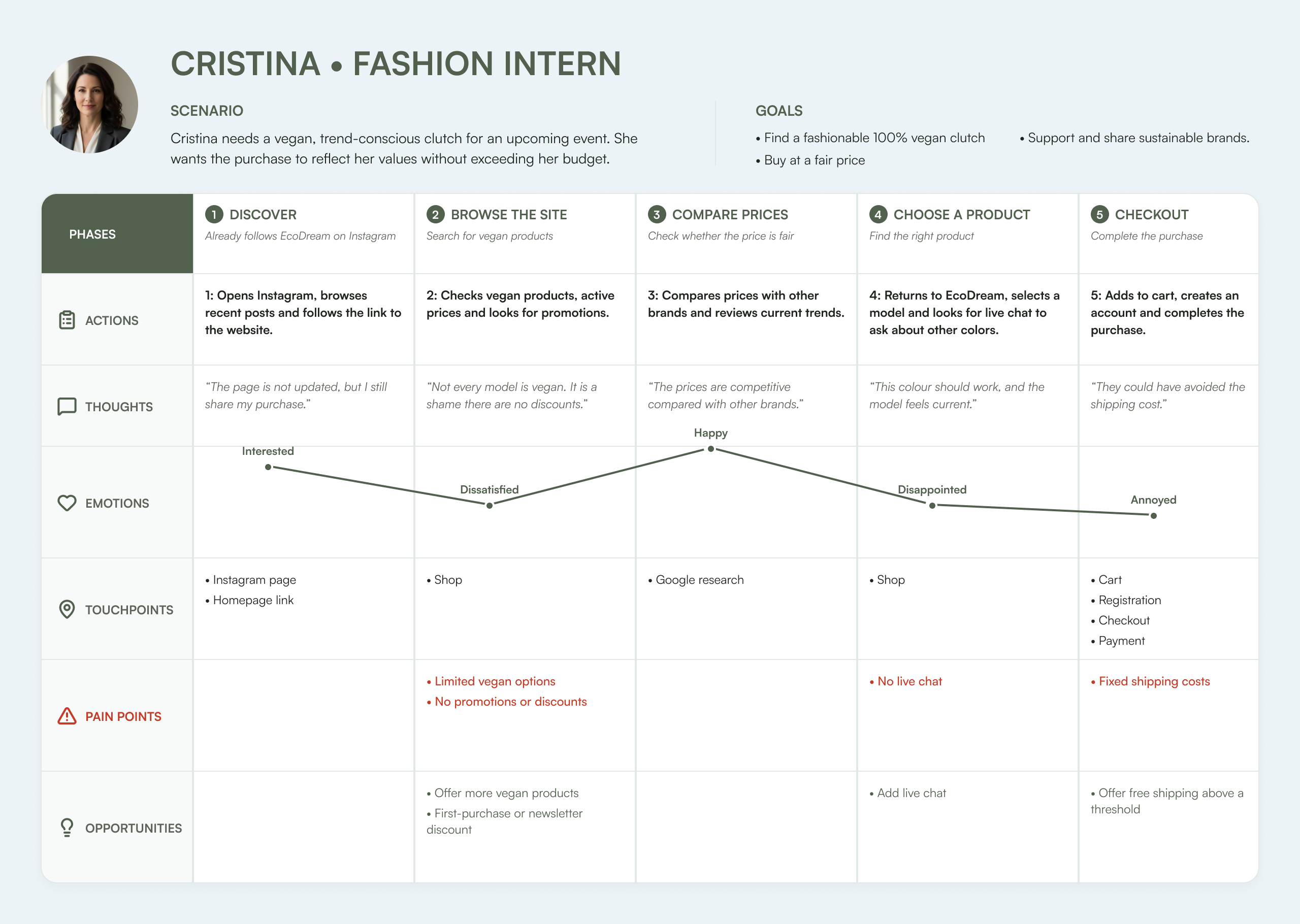
  4. Personas and journey mapping

What I discovered

  1. Participants struggled to locate products and essential information.
  2. Missing search, filters, and breadcrumbs made browsing inefficient.
  3. Scattered and repetitive content increased cognitive load.
  4. Unclear product and policy information reduced user confidence.

I conducted a heuristic evaluation across desktop and mobile, using Nielsen’s 10 usability principles
to identify recurring friction and translate the findings into clear redesign priorities.

Accessibility Audit & Improvements

I evaluated five key pages using six accessibility tools and WCAG guidance, focusing on content structure, alternative text, keyboard access, visual clarity, and form feedback. The findings shaped targeted improvements intended to make the redesigned shopping experience more inclusive and easier to understand.

Structure

HTML & Landmarks

1.3.1 · A
Issue identified

Heading levels were inconsistent, while semantic landmarks and ARIA attributes were missing.

Improvement introduced

A logical heading hierarchy, semantic regions, and meaningful labels make the page easier to navigate and interpret.

Clearer structure Improved

Images & Media

Alternative Text

1.1.1 · A
Issue identified

Alternative text was often missing or uninformative, while some meaningful images were hidden from assistive technology.

Improvement introduced

Informative images receive contextual alternative text, while decorative assets are excluded from the reading flow.

Useful alternatives Improved

Keyboard Flow

Focus & Navigation

2.4.3 · A / 2.4.7 · AA
Issue identified

Focus indicators were difficult to see and the navigation order did not always follow the visual flow.

Improvement introduced

Visible focus states, a more predictable sequence, and clearer navigation controls support keyboard use.

Predictable flow Improved

Contrast & Type

Visual Clarity

1.4.3 · AA
Issue identified

Low-contrast text, thin weights, and dense content reduced readability and made key information harder to scan.

Improvement introduced

Stronger contrast, readable weights, shorter text blocks, and clearer hierarchy improve comprehension.

Readable content Improved

Forms & Actions

Labels & Feedback

3.3.1 / 3.3.2 · A
Issue identified

Inputs lacked persistent labels, link text was often vague, and errors relied on a subtle red border without explanatory feedback.

Improvement introduced

Persistent labels, meaningful actions, and clear multimodal feedback make forms easier to understand and recover from.

Explicit feedback Improved

Outcome: Follow-up checks indicated a clear improvement across the areas reviewed. Further validation would still be required before claiming full WCAG conformance.

Accessibility improved

To understand where EcoDream was falling behind, and where it already stood apart, I benchmarked seven direct competitors across four subjects:
website and discovery, product experience, customer trust, and brand sustainability.
I looked for recurring market conventions and the patterns shaping customers’ ability to find, evaluate, and confidently purchase a product.
The comparison below highlights both the gaps to address and the strengths worth preserving.

I conducted a 15-question survey to understand how potential customers evaluate sustainable accessories, which information builds confidence, and what prevents them from completing a purchase.

Personas and Journey Mapping

Based on recurring patterns from the survey and audit findings, I created three research-informed personas.
Each profile combines observed needs and behaviours with plausible contextual details, making different shopping mindsets easier to understand and translate into design priorities.

Portrait of Veronica

Veronica

42 · Marketing Manager · Milan

35% green awareness 35%

A busy professional looking for a spacious, durable bag that works across commuting and client meetings.

Needs

I need the right information quickly—without interrupting my day.

Behaviour

Time-sensitive, often shops from mobile and checks dimensions before buying.

Design response

Prioritise scannable specifications, capacity information and a shorter purchase path.

Portrait of Joseph

Joseph

32 · Software Engineer · Rome

65% green awareness 65%

A deliberate online shopper who checks materials, availability and reviews before investing in long-lasting products.

Needs

I compare carefully before investing in something that should last.

Behaviour

Checks reviews, filters options and evaluates materials and production.

Design response

Add filters, customer reviews, stock visibility and transparent material details.

Portrait of Cristina

Cristina

24 · Fashion Intern · Milan-Paris

90% green awareness 90%

A sustainability-led fashion shopper balancing vegan values, trends and a limited budget.

Needs

I want sustainability, style and price to feel compatible.

Behaviour

Compares brands, verifies vegan claims and remains sensitive to shipping costs.

Design response

Strengthen sustainability evidence and surface total costs earlier.

05. Design Process

I translated the research findings into a clearer, intuitive and more accessible shopping experience,
moving from information architecture and wireframes to a responsive interface and reusable design system.

What I did

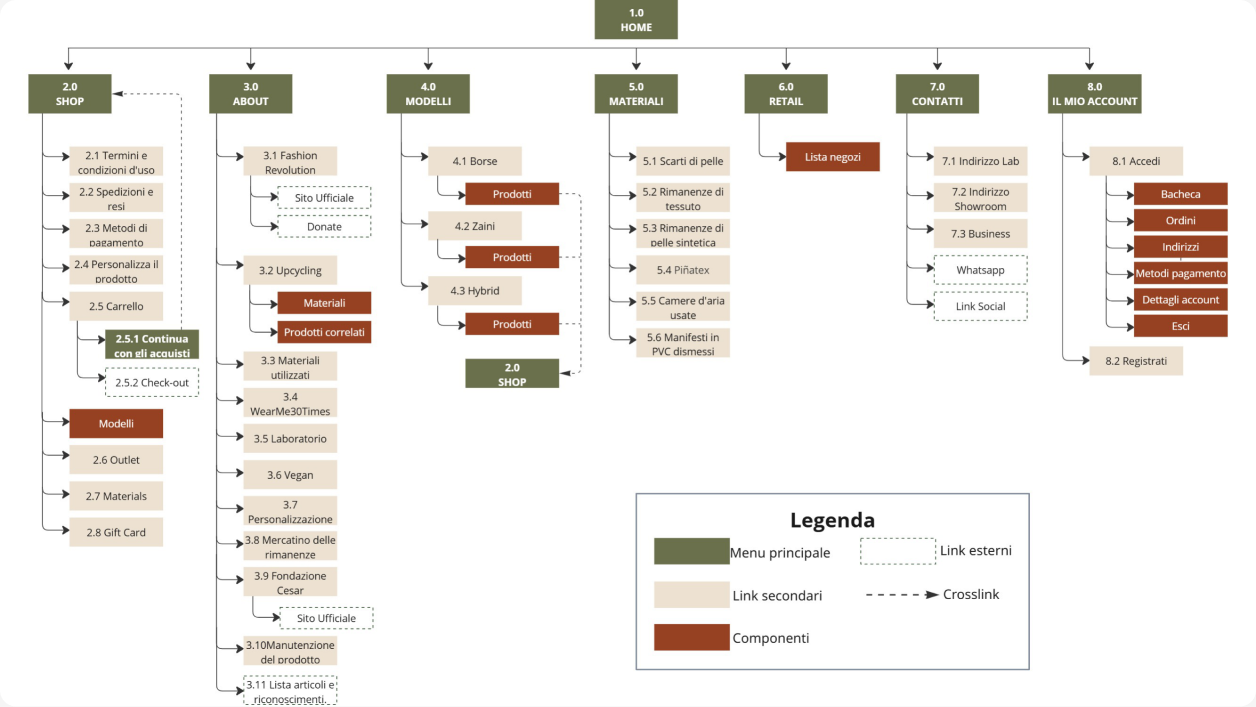
  1. Restructured the information architecture
  2. Created desktop and mobile wireframes for five key pages, focusing on navigation and product discovery.
  3. Defined the visual foundations and reusable UI components
  4. Designed and prototyped the 5 pages.

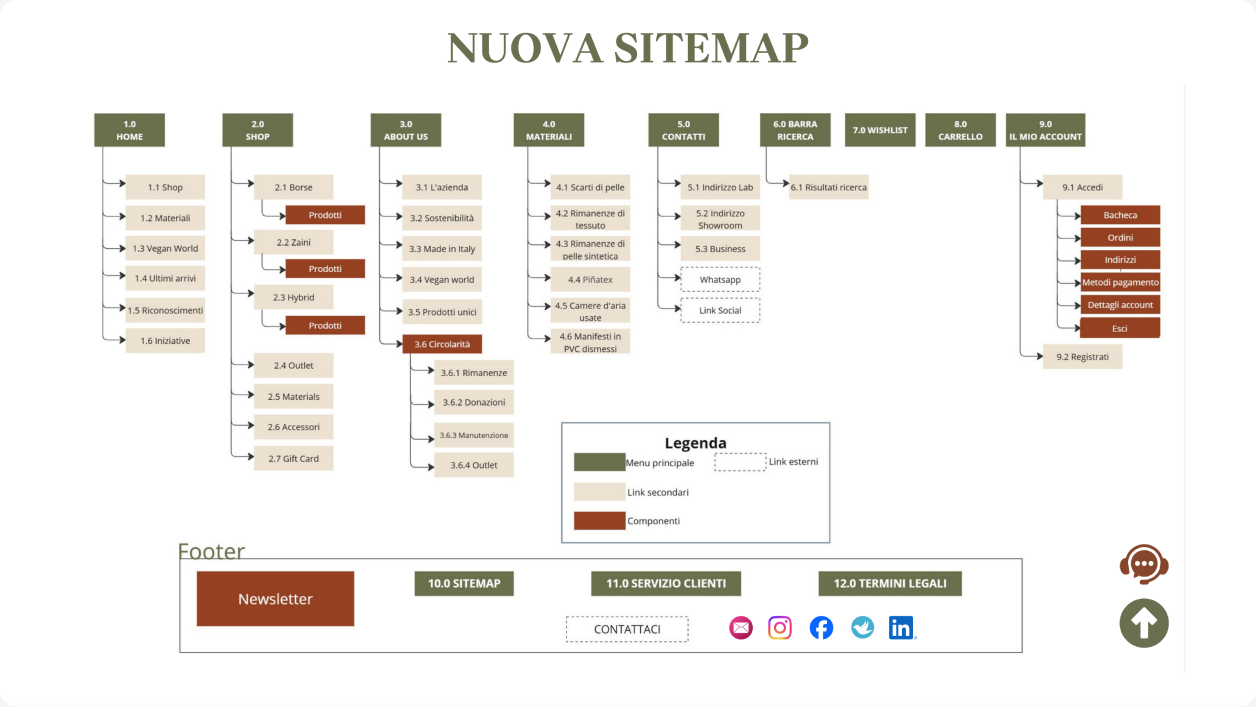
The original site scattered related content across multiple pages and provided limited access to key shopping functions.
I reorganized the information architecture around users’ primary goals: understanding the brand, exploring the catalogue, and finding essential purchase information.

Wireframing

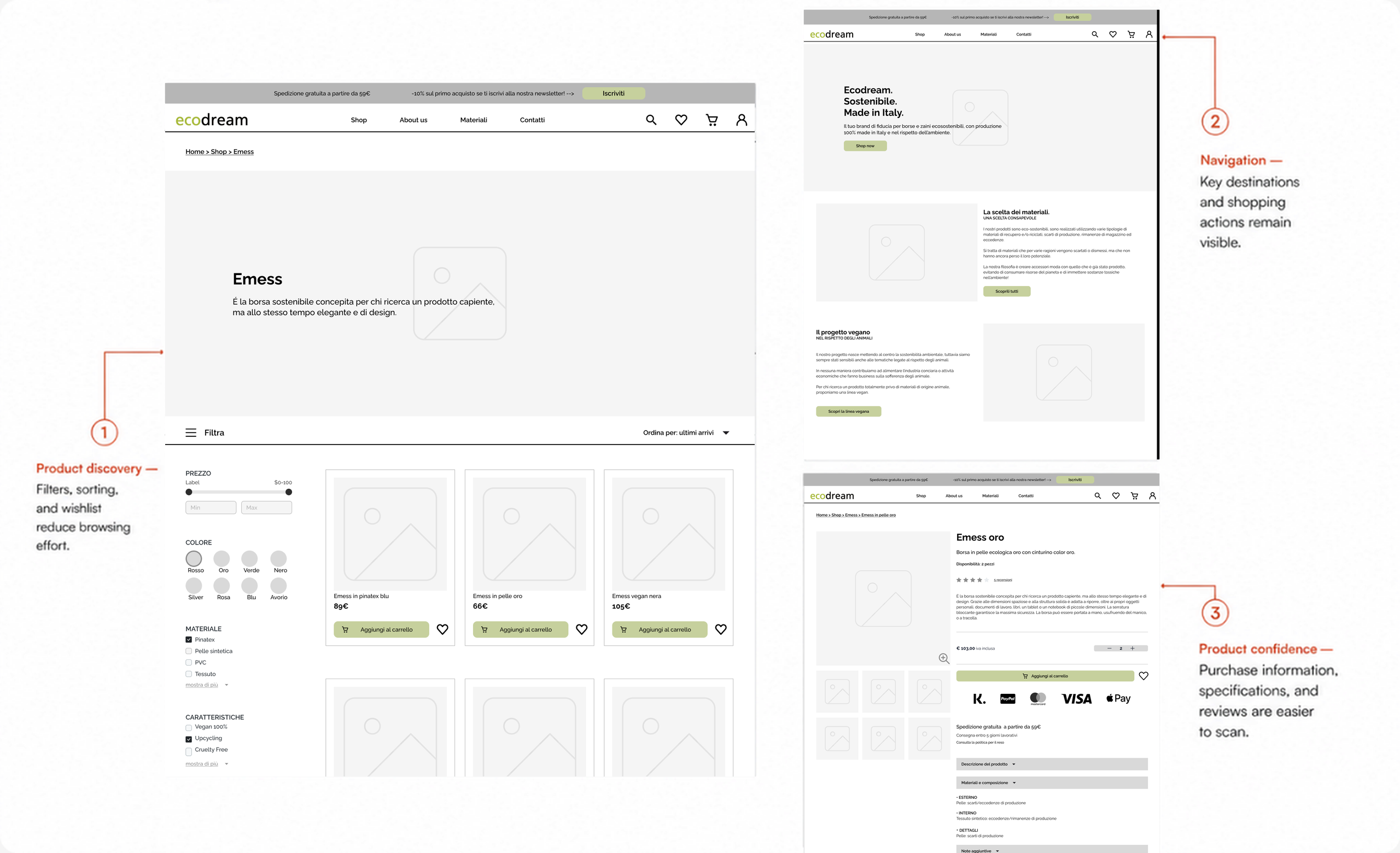
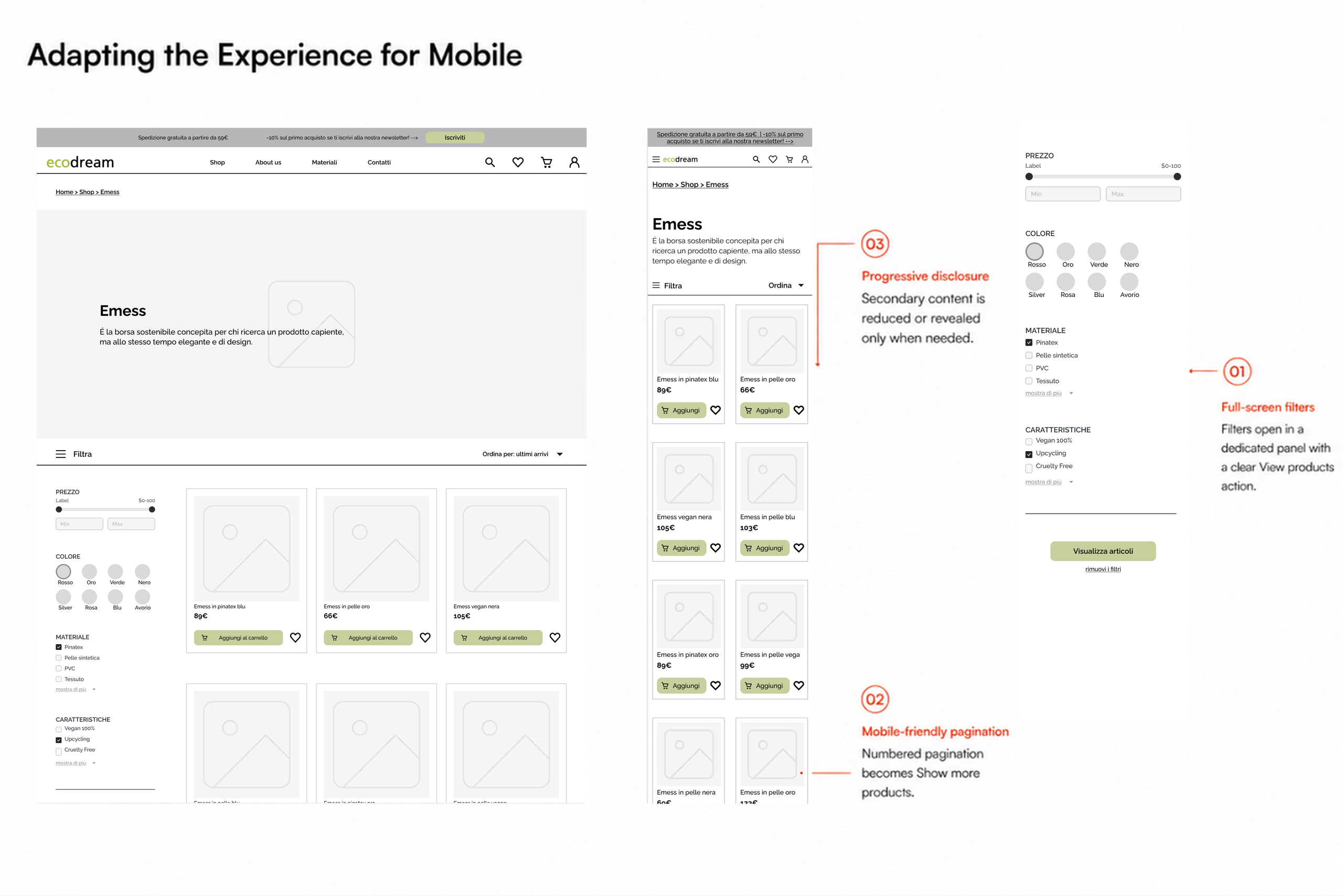
Using the revised information architecture as a foundation, I developed responsive wireframes for five key pages. I applied familiar e-commerce patterns and progressive disclosure to simplify navigation, reduce the effort required to find and compare products, and surface decision-critical information at the right moment.

Annotated desktop wireframes for the product listing, homepage and product detail page, highlighting improvements to filters, navigation and purchase information
Annotated comparison of desktop and mobile product-listing wireframes, including responsive product cards and a full-screen filter panel

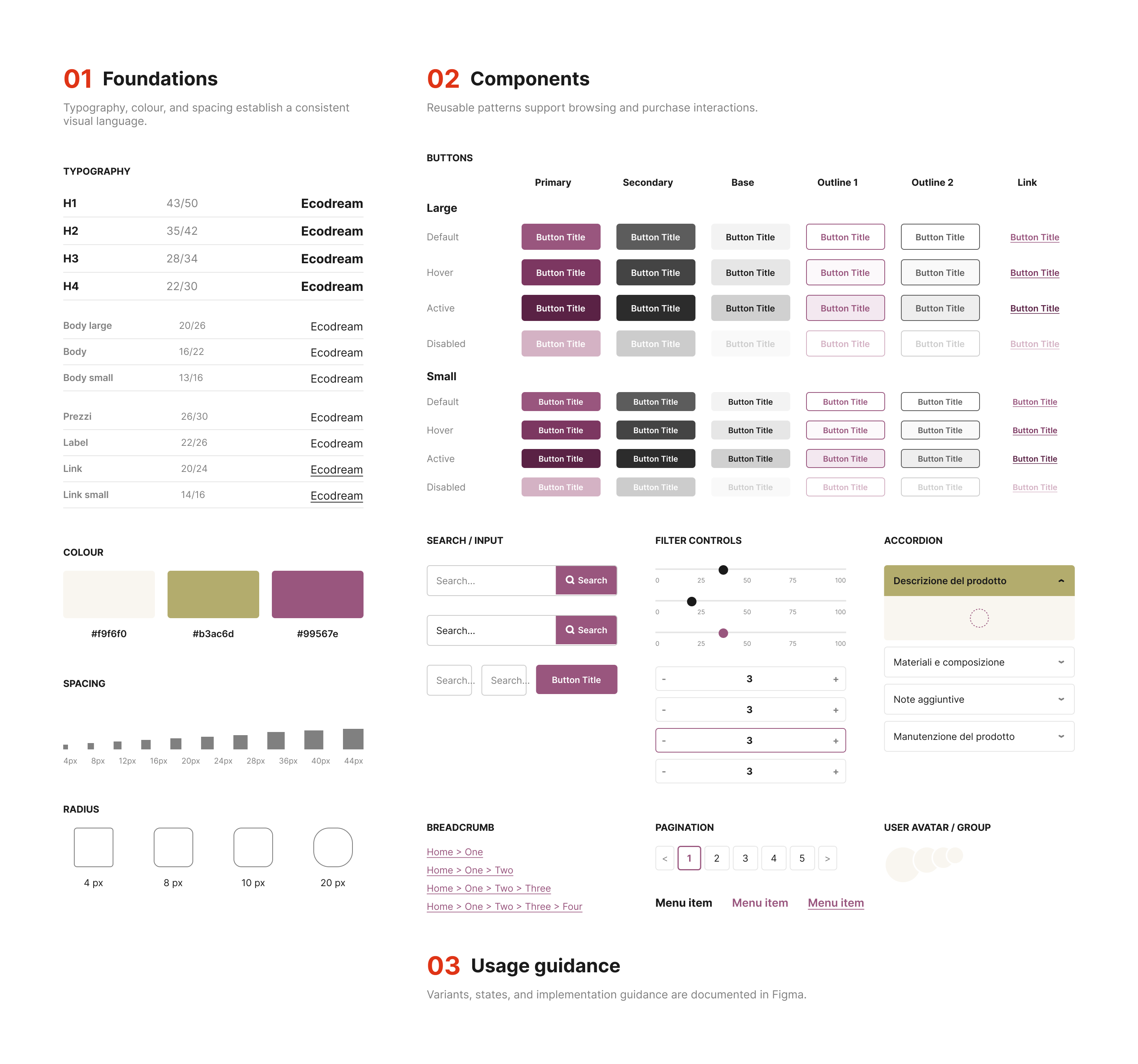
I created a project-level design system combining visual foundations, reusable components, interaction states,
and usage guidelines to maintain consistency across desktop and mobile.

User Interface

Applying the design system across five key pages, I transformed the wireframes into responsive high-fidelity interfaces.
The comparisons below show how each screen addresses the navigation, product discovery, and content hierarchy issues identified during research.

Homepage Clarity
Before
After
About Us Storytelling
Before
After
Shop Discovery
Before
After
Model Page Overview
Before
After
Product Page Confidence
Before
After
01–02 / 05

06. Prototype & Usability Testing

I tested the mobile prototype with seven participants to evaluate whether the redesigned navigation and product-discovery flow supported four core tasks.
Remote, unmoderated sessions were recorded in Maze and reviewed for completion, misclicks, and perceived ease of use.

Full prototype here

7 participants · 4 tasks · Mobile prototype · Remote, unmoderated

Test Results

100% Assigned tasks completed
4.7/5 Average post-test rating
86% Navigation met expectations

All tasks were completed, but two journeys produced high misclick rates and revealed avoidable friction.

Key Findings & Design Response

  1. Company information remained a bit difficult to locate

    Although the task was completed successfully, it took 60.9 seconds on average and recorded a 77.9% misclick rate.

    Design response

    Make company information more visible by adding a dedicated homepage call to action and improving navigation labels.

  2. Users expected a search function

    Six of seven participants selected search as their first action, and every participant interacted with it at least once.

    Design response

    Implement and validate the complete search and results flow.

07. Outcomes & Reflection

Testing validated the overall direction of the redesigned experience while identifying the areas that still require refinement.
Participants completed all four assigned tasks and rated the overall experience positively. However, testing revealed remaining friction around search and company-information discovery, helping define clear priorities for the next iteration.

Next iteration

  1. Validate search, sitemap, and wishlist interactions.
  2. Make company information more visible, including a homepage call to action.
  3. Surface shop subcategories directly in the main navigation.
  4. Reduce misclicks through clearer interactive states and more explicit copy.
  5. Retest the revised flows and include an accessibility review.

Testing limitations

The study involved seven participants and focused on four navigation and product-discovery tasks within a mobile prototype. Some misclicks were caused by prototype limitations, particularly the non-functional search interaction. The findings should therefore be considered directional and validated through further testing.